Bridge Pattern | Structural Design Patterns
- Published on
- Rohan Dcunha--4 min read
Overview
What is a Bridge Pattern?
The Bridge pattern is a structural design pattern that decouples an abstraction (what a class does) from its implementation (how it does it), allowing them to vary independently. It is useful when you want to separate the abstraction and implementation hierarchies and be able to modify them independently.
In the context of software development, the Bridge pattern is often used when you have multiple implementations of a feature or functionality, and you want to provide a way to switch between them without affecting the client code.
The key components of the Bridge pattern are:
-
Abstraction: This represents the high-level interface or abstraction that clients interact with. It contains a reference to the implementation object and defines methods that delegate the work to the implementation.
-
Implementation: This represents the low-level implementation that the abstraction relies on. It provides the concrete implementation of the methods defined in the abstraction.
Advantages
-
Separation of concerns: The Bridge pattern allows you to separate the abstraction from its implementation, making it easier to modify and extend each independently.
-
Encapsulation: The Bridge pattern encapsulates the implementation details within the implementation classes, hiding them from the client code.
-
Flexibility: The Bridge pattern provides flexibility by allowing you to switch or add new implementations without affecting the client code.
When to use it?
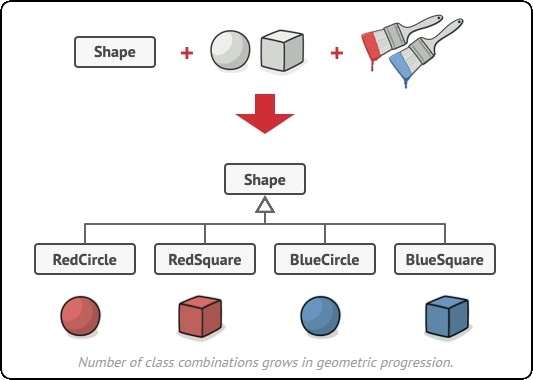
How to use it?
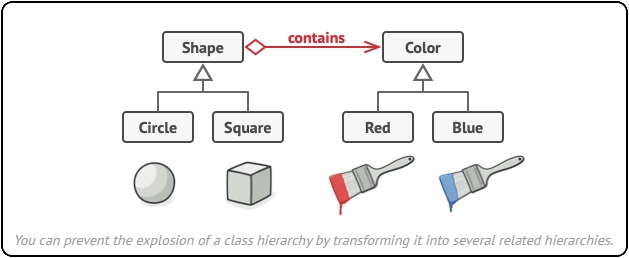
Image courtesy: refactoring.guru: bridge-pattern
The key benefit is separating the abstraction (what a class does) from its implementation (how it does it). This allows you to modify or extend both the IShape interface and its implementations (Circle, Square) independently without affecting the other. You can add new shapes like Triangle or change the way Circle is drawn without impacting the way colors are applied.
// IShape interface
public interface IShape
{
    Color Color { get; set; }
    void Draw();
}

// Implementor classes - Circle and Square
public class Circle : IShape
{
    public Color Color { get; set; }

    public void Draw()
    {
        Console.WriteLine("Drawing a circle with color {0}", Color);
    }
}

public class Square : IShape
{
    public Color Color { get; set; }

    public void Draw()
    {
        Console.WriteLine("Drawing a square with color {0}", Color);
    }
}

// Abstraction class - Color
public abstract class Color
{
    public abstract void ApplyColor();
}

// Concrete classes - Red and Blue
public class Red : Color
{
    public override void ApplyColor()
    {
        Console.WriteLine("Applying red color");
    }
}

public class Blue : Color
{
    public override void ApplyColor()
    {
        Console.WriteLine("Applying blue color");
    }
}

// Refine abstraction for implementors
public class ShapeWithColor
{
    private readonly IShape _shape;
    private Color _color;

    public ShapeWithColor(IShape shape, Color color)
    {
        _shape = shape;
        _color = color;
    }

    public void Draw()
    {
        _color.ApplyColor();
        _shape.Draw();
    }
}

public class BridgeDemo
{
    public static void Main(string[] args)
    {
        IShape circle = new Circle();
        IShape square = new Square();

        Color red = new Red();
        Color blue = new Blue();

        ShapeWithColor redCircle = new ShapeWithColor(circle, red);
        ShapeWithColor blueSquare = new ShapeWithColor(square, blue);

        redCircle.Draw();
        blueSquare.Draw();
    }
}
- We have interfaces IShape and Color which define what functionalities the implementor classes should provide.
- We have implementor classes Circle and Square that implement the IShape interface. These classes have a Draw() method that renders the respective shape.
- We have abstract class Color with a mandatory method ApplyColor().
- We have concrete classes Red and Blue that inherit from Color and implement the ApplyColor() method to set the specific color.
- Class ShapeWithColor bridges the gap between IShape and Color. It holds a reference to an IShape object and a Color object. The Draw() method calls the ApplyColor() method of the Color object and then delegates the drawing to the IShape object.
- In the Main() method, we create instances of different shapes and colors and then use the ShapeWithColor class to combine them. This is a basic implementation of the Bridge design pattern. You can further extend this code to include more shapes and colors.